Das Problem: Manuelle Haaranalyse skaliert nicht
Jeder Trichologe kennt das Prozedere: ein Kopfhautbild anstarren, Follikel einzeln zählen, Dicke schätzen, Richtung beurteilen, alles aufschreiben. Dreißig Minuten später haben Sie ein einzelnes Bild analysiert.
Ihre Patienten wollen objektive Daten. Ihre Klinik braucht konsistente Bewertungen. Aber manuelles Zählen ist:
- Langsam: 30+ Minuten pro Bild
- Subjektiv: Verschiedene Praktiker, verschiedene Ergebnisse
- Schwer zu verfolgen: Bewertungen über die Zeit zu vergleichen ist nahezu unmöglich
- Nicht skalierbar: Sie können Ihre Praxis nicht ausbauen, wenn Sie Stunden mit Analysen verbringen
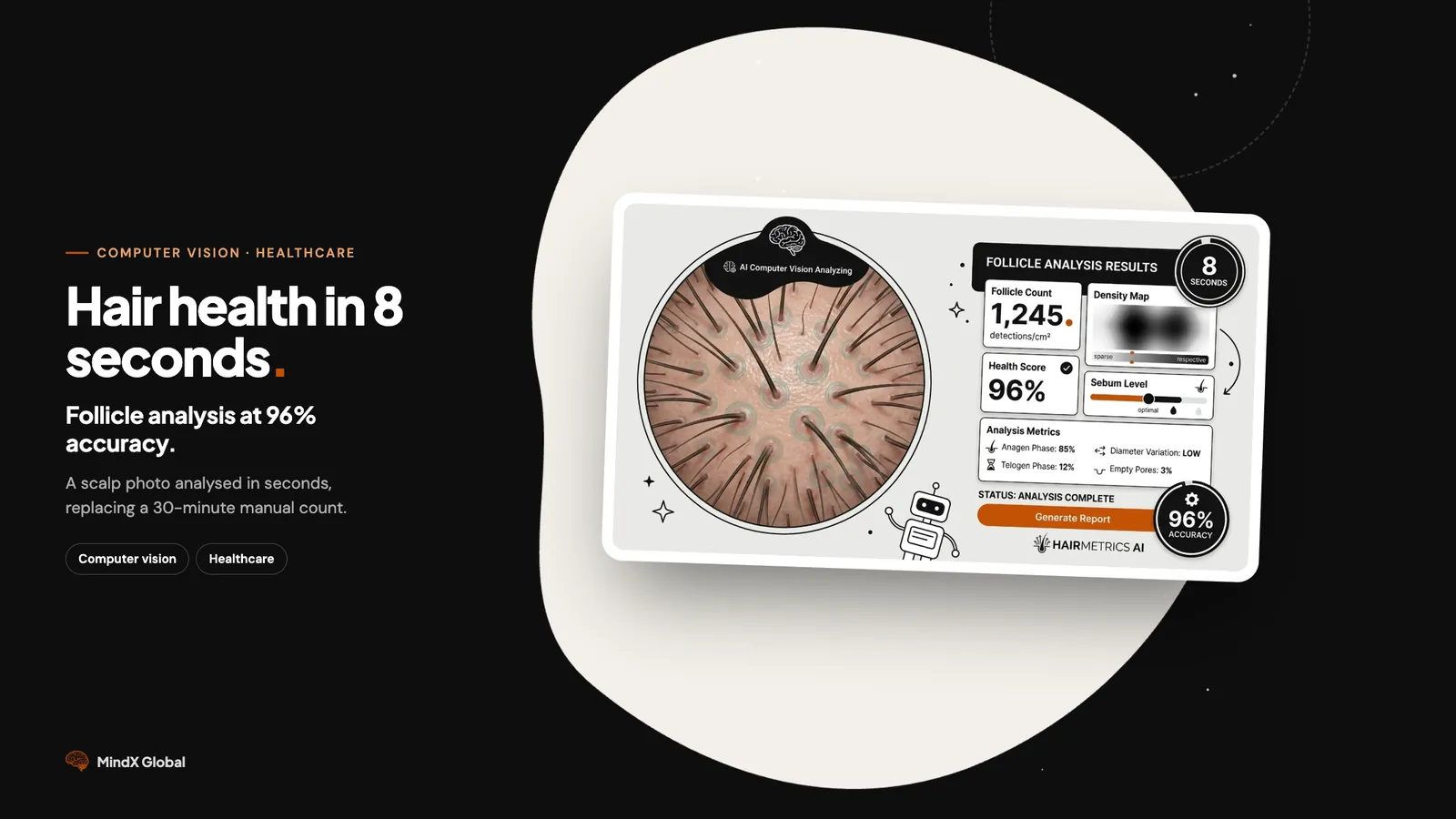
Was wäre, wenn Sie ein Kopfhautbild in 8 Sekunden mit 96% Genauigkeit analysieren könnten?
Was wir entwickelt haben: KI-gestützte Haarfollikelanalyse
Wir haben mit einer Trichologie-Klinik zusammengearbeitet, um ein automatisiertes Analysesystem zu entwickeln. Bild hochladen, vollständigen Diagnosebericht erhalten — sofort.
Das Ergebnis-Dashboard
| Kennzahl | Was es zeigt |
|---|---|
| Gesamte Haarfollikel | Vollständige Zählung (81 Follikel in diesem Scan) |
| Erkennungserfolgsrate | 100% der Follikel klassifiziert |
| Konfidenz-Score | KI-Sicherheit für jede Erkennung (Durchschn. 59,1%) |
| Haardickenverteilung | Aufschlüsselung nach Kategorie |
Haarklassifizierungskategorien
Die KI kategorisiert jeden Follikel nach Dicke:
- Großes Terminalhaar (>90 μm) — Starke, gesunde Follikel
- Mittleres Terminalhaar (60-90 μm) — Normale Dicke
- Kleines Terminalhaar (30-60 μm) — Ausdünnungsindikatoren
- Vellus-/Miniaturisiertes Haar (<30 μm) — Schwache Follikel, die Aufmerksamkeit erfordern
So funktioniert es: 3 einfache Schritte
Schritt 1: Hochladen Ziehen Sie Ihr Trichoskopie-Bild per Drag & Drop. Das System beschneidet und optimiert automatisch für die Analyse.
Schritt 2: KI-Analyse Unser Computer-Vision-Modell — trainiert mit 4.000+ annotierten Bildern — segmentiert jeden Follikel und berechnet Position, Anzahl, Dickenklassifizierung, Wachstumsrichtung und Konfidenz-Score.
Schritt 3: Bericht herunterladen Erhalten Sie ein klinikfertiges PDF mit allen Kennzahlen, Visualisierungen und Tracking-Daten.
Der technische Vorteil
Warum wir Segmentierung verwendet haben (nicht nur Erkennung)
Die meisten KI-Systeme verwenden Bounding Boxes — Rechtecke um erkannte Objekte. Wir verwenden pixelgenaue Segmentierung.
| Ansatz | Genauigkeit | Detailgrad |
|---|---|---|
| Bounding Boxes | Gut | Formapproximation |
| Segmentierung | Besser | Exakte Follikelgrenzen |
Segmentierung ermöglicht uns, tatsächliche Haarformen präzise abzubilden, überlappende Follikel zu verarbeiten, geometrische Richtung aus der Konturform zu berechnen und erklärbare Ergebnisse zu liefern, denen Kliniker vertrauen.
Ergebnisse für die Klinik
| Vor KI | Nach KI | Auswirkung |
|---|---|---|
| 30 Min. pro Bild | 8 Sekunden | 99,5% schneller |
| Subjektive Bewertungen | Objektive Kennzahlen | Konsistent über Praktiker hinweg |
| Manuelle PDF-Erstellung | Automatisch generierte Berichte | 5+ Stunden/Woche gespart |
| Schwieriges Fortschritts-Tracking | Standardisierte Daten | Einfacher Längsschnittvergleich |
Was der Klinikdirektor sagte:
"Wir haben früher den halben Tag mit Analysen verbracht. Jetzt analysieren wir in einer Stunde mehr Patienten als früher in einer Woche. Die standardisierten Berichte haben komplett verändert, wie wir den Behandlungsfortschritt verfolgen."
— Haargesundheitsklinik, Malaysia
Ist dies das Richtige für Ihre Klinik?
Das passt für:
- Trichologie- und Haarausfall-Kliniken, die prüfen, ob eine Behandlung wirkt
- Dermatologen, die Haarausfall beurteilen
- Haartransplantations-Chirurgen, die einen Eingriff planen
- Forscher, die Haar- und Kopfhautgesundheit untersuchen
- Wellness-Zentren, die einen Kopfhaut-Check anbieten